3. Custom keywords
Custom keywords let you highlight words or phrases that matter to your own site, plugin, theme or debugging workflow.
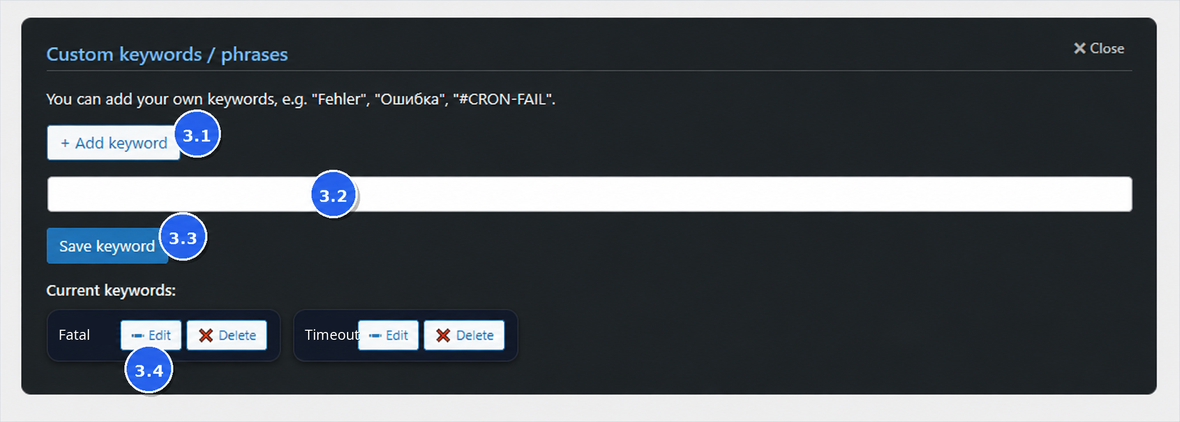
Figure 3. Custom keywords — 3.1 Add keyword, 3.2 Keyword field, 3.3 Save keyword, 3.4 Edit.
3.1 Add keyword
Click + Add keyword to start a new keyword entry.
3.2 Add a custom keyword
Enter a custom word or short phrase you want to highlight, for example fatal, timeout or Undefined array key.
3.3 Save
Click Save to store the keyword. Saved keywords are applied when viewing logs.
When a loaded log contains your custom words or phrases, matching lines can be highlighted and reviewed with the Custom filter.
3.4 Edit saved keywords
Use Edit to refine a keyword. Prefer specific phrases to avoid excessive highlighting.
Troubleshooting: Custom keywords
- Too many highlights: the keyword is too generic → edit it to be more specific.
- No highlight: check spelling and spacing. The keyword must match the text in the loaded log preview.