11. Security and safe paths
Security and sensitive path settings control access to locations and information that can expose details about your hosting environment. These options are powerful, so they should stay disabled unless they are really needed.
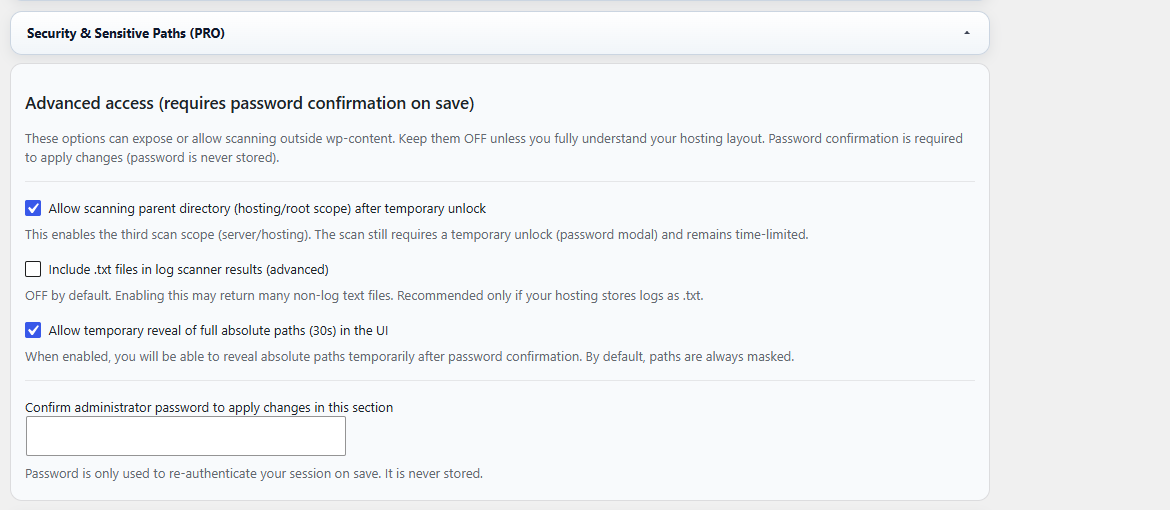
Figure 11. Security & Sensitive Paths — advanced access options for parent-directory scanning, optional .txt scanner results and temporary reveal of full absolute paths.
Advanced access options
- Allow scanning parent directory enables a wider hosting/root-level scan scope after temporary unlock.
- Include .txt files in log scanner results can help when a host stores logs as text files, but it may also return many unrelated files.
- Allow temporary reveal of full absolute paths lets an administrator reveal absolute paths briefly in the UI after confirmation.
- Administrator password confirmation is required to apply changes in this sensitive section.
Recommended use
- Keep these options disabled by default.
- Enable parent-directory scanning only when you know the log is outside the normal WordPress content area.
- Enable .txt scanner results only when your server really stores logs as text files.
- Use temporary path reveal only for debugging or setup, then hide paths again.
- Do not publish screenshots that show real absolute paths, usernames, hosting directories or webhook URLs.
Warning: Full server paths can expose sensitive hosting information. Reveal them only when necessary and avoid showing them in public documentation, support tickets or screenshots.
Good default: Use safe path formats such as wp-content::, wp-root:: and carefully controlled wp-parent:: paths instead of displaying full absolute paths.