12. Pinboard – pinned log monitoring
Pinboard is a separate PRO workspace for selected log snippets in the main Log Viewer screen. It is not a Log Hub feature. It helps you keep a few important log sections close while you debug, compare related entries or work through a support session.
Best use: Pinboard is for “keep these few logs close while I work.” Start with only the most important selections so the workspace stays readable.
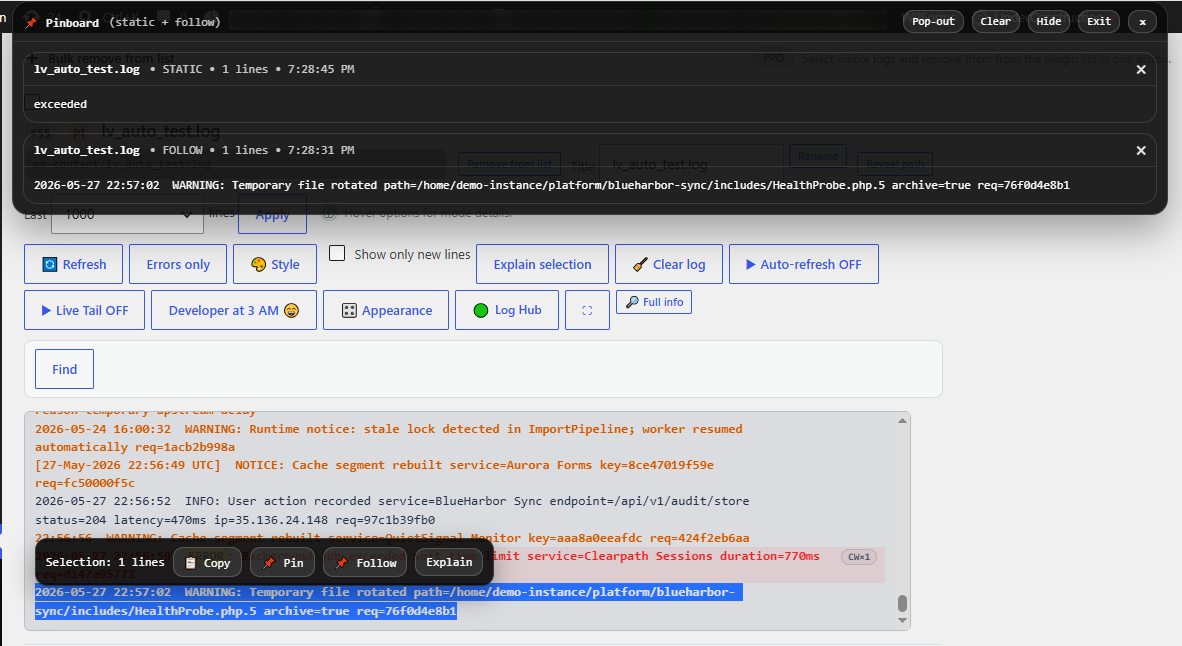
Figure 12. Pinboard lets you keep selected logs pinned for quick access and side-by-side observation during debugging or support work.
How pinning works
- Open the main Log Viewer screen.
- Select text inside a displayed log window.
- Use the small selection toolbar to copy, pin a static snippet, pin a follow snapshot or send the selection to Explain when available.
- Pinned items appear in a floating Pinboard panel at the top of the admin screen.
Static and follow pins
- Static pins keep the exact selected text as a snapshot.
- Follow pins remember the selected log and number of selected lines, then refresh the pinned snippet from the latest visible log content when that log changes.
- Follow pins watch the current main log output, including the active Diff view when Diff is enabled for that log.
- Follow updates depend on the existing log window update flow, such as Refresh, Auto-refresh, Live Tail, Diff refreshes or compatible log update events.
What is remembered
Pinboard stores pinned items in the browser using localStorage. Pins are local to that browser/profile, can sync with another open admin tab or the Pinboard pop-out window, and are not saved as WordPress database settings.
- The current implementation keeps up to 12 pinned items.
- New pins are added first.
- You can remove individual pins, clear the board, hide it or open a pop-out view.
How it differs from other PRO modules
- Main Log Viewer is for detailed single-log work.
- Log Hub is for aggregated/current signal overview across selected logs.
- Reports are for historical review of collected activity.
- Pinboard is a quick pinned observation workspace for a few selected snippets or follow snapshots.
Privacy note: Pinned snippets can contain real log content. Avoid sharing screenshots or pop-out windows that show private paths, customer data, secrets or sensitive log lines.